
Safetix digital ticket

Account Manager

SAFETIX™ DIGITAL TICKET

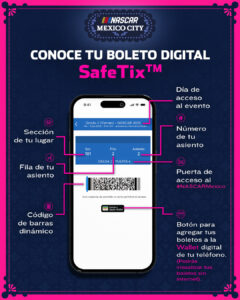
SafeTix™ is the digital ticket that will be used to access the NASCAR Mexico City Weekend. This digital ticket uses dynamic codes that constantly change to prevent counterfeiting, with this, Ticketmaster has improved security measures for your access to the event.

If you bought tickets for someone else, you can easily transfer them from your NASCAR Mexico Account Manager account, where you can log in with your Ticketmaster user.

You will be able to add your ticket to your phone digital Wallet for offline use.
HOW DO I GET INTO THE AUTODROMO HERMANOS RODRIGUEZ ON THE DAYS OF THE EVENT?

Step 1

En tu puerta de acceso, muestra tu boleto digital SafeTix™ en tu teléfono desde tu cuenta en el NASCAR México Account Manager.

At your gate, show your SafeTix™ digital ticket on your phone from your NASCAR Mexico Account Manager account.

Step 2:

Present the dynamic barcode of your SafeTix™ digital ticket, remember that your tickets cannot be scanned from a screenshot.

Step 3:

Verify that the elements of your digital ticket are in motion.

Step 4:

Present your phone with no damage to the screen, it is required to have a good quality of brightness and contrast on the screen.

Step 5:

The battery of your phone must be charged.

Step 6:

If you have already downloaded your ticket to your digital Wallet (Apple Wallet or Google Wallet), open it and the reader will scan it. If you have more tickets, just swipe to the right so they can be scanned.

HOW TO READ MY SAFETIX™ DIGITAL TICKET?

Nascar use cookies to provide you with personalised information. To deactivate them please open the Privacy settings in your browser and turn them off for our website. For more details please read our Privacy Notice.
x